
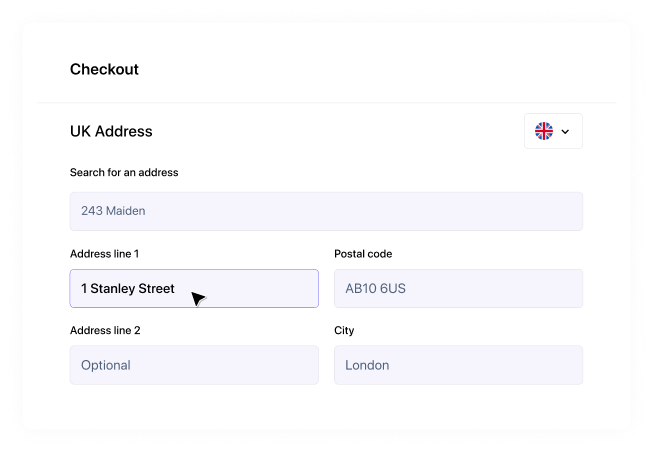
Address line 1 is the first line of a street address, usually the house number and street name, such as 14 Mill Lane. Address line 2 is optional and holds whatever doesn't fit on line 1, most often a flat number, a building name or a village. Below those come the town and the postcode, and the county is optional.
This approach generally covers most addresses, but this article caters specifically to the ones it doesn't: flats inside named buildings, cottages with no number, business parks and villages that share a post town. It also explains how Royal Mail structures an address behind the scenes, which is important if you're deciding how many fields your checkout or sign-up form should have.
The rule that settles almost every case is simple to remember. A UK address runs from the smallest unit to the largest, top to bottom: flat, building, street, village or area, town, and postcode.
What goes in address line 1
Line 1 is the part of the address that identifies the front door. For most homes, that's the building number followed by the street, for example, 27B Station Road. Letters after a number, like the B here, belong with the number rather than on a line of their own.
If the property has a name and no number, the name takes line 1, and the street moves down to line 2. A house called Rose Cottage on Mill Lane is written as two lines: Rose Cottage, then Mill Lane.
When the address includes a flat, the flat comes first because it's the smallest unit. Flat 4 goes on line 1, and the building or street goes on line 2. You'll also see a flat and street squeezed onto one line, as in Flat 4, 22 Quay Street. That still gets delivered, as long as the order runs from small to large.
What goes in address line 2
Line 2 is for the next level up from line 1, and plenty of addresses don't need it, but it typically holds one of these:
- the street, when line 1 is a house name or a flat number
- the building name, when line 1 is a flat inside a named block
- a village or area, known to Royal Mail as a locality, when the street alone isn't enough to find the address
If your address fits on line 1 with the town and postcode beneath it, leave line 2 blank. Forms that make line 2 compulsory push people into repeating the town or inventing something to fill it, and both make the data harder to match later.
The order above follows the structure set out in the Universal Postal Union's addressing guide for Great Britain, which lists Royal Mail as the UK contact for addressing queries.
Address line 3, town, county and postcode
Address line 3 is for addresses with one more layer, usually a village or area that sits below the post town. A cottage in a named terrace, on a named road, in a village, needs all three lines before the town.
Town means the post town; the town Royal Mail sorts the mail through. It isn't always the place you'd say you live. Plenty of villages and suburbs share a post town with a larger town nearby, which is why the village goes on its own line above it. Royal Mail's examples write the post town in capitals, which helps on an envelope but isn't needed in an online form.
County is optional. Royal Mail stopped using postal counties to sort mail in 1996 and removed them from the Postcode Address File in 2000, and the UPU guide notes that the county isn't needed when the post town and postcode are given. Including one does no harm, but a form shouldn't insist on it.
Postcode goes last, on its own line. A UK postcode is five to seven characters with a space before the final three, such as SW1A 1AA, and the UPU guide lists the six patterns a valid one can follow. The part before the space (the outward code) points to the area and district. The part after it (the inward code) narrows it to a street or part of one.
UK address examples
Here's how the most common address types fill a standard form. The streets and postcodes are made up for illustration.
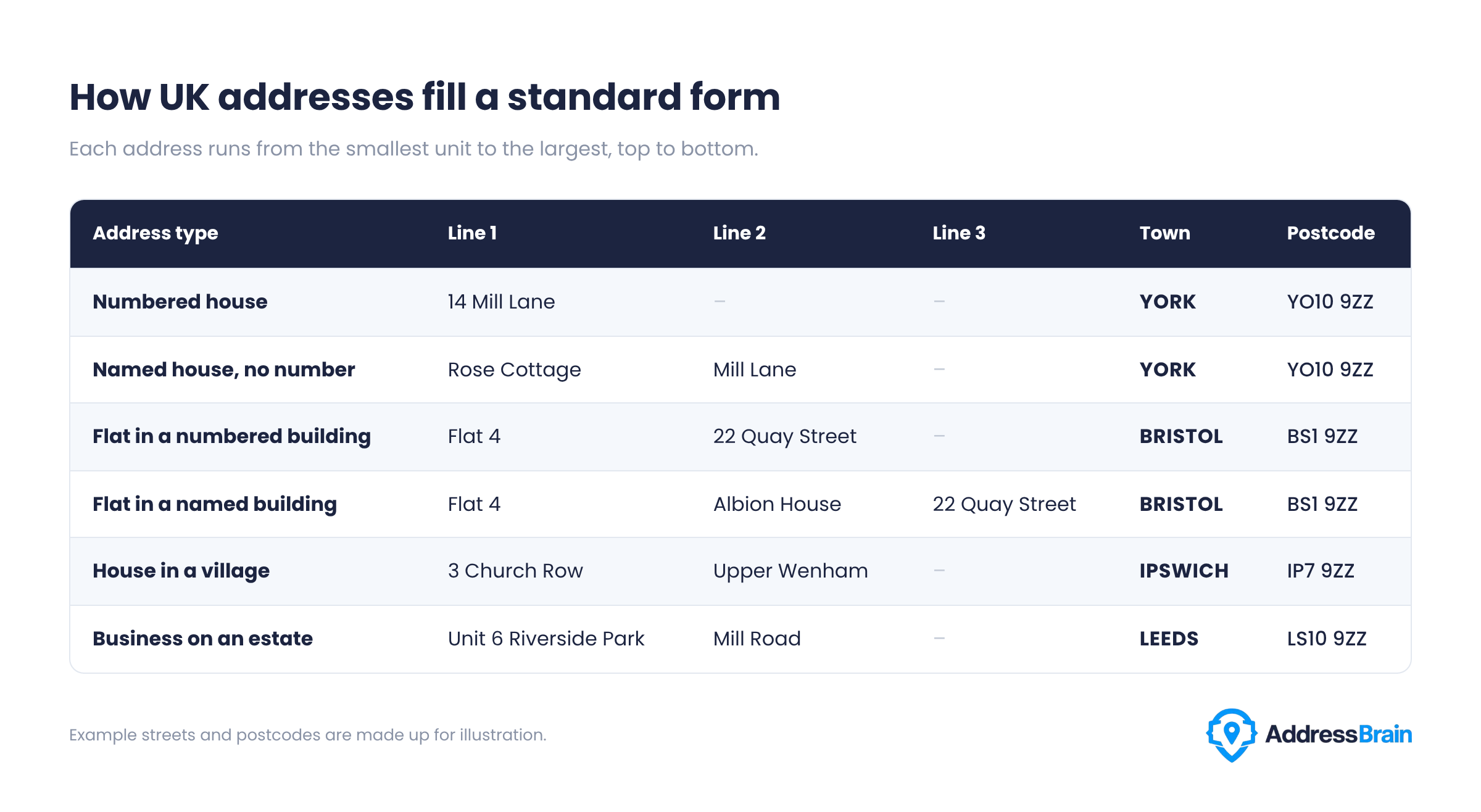
Two of these trip forms up more than the rest. The named building has four parts above the town, so a form with only two address lines forces people to merge two of them, and you'll get Flat 4 Albion House in one field and 22 Quay Street in the next, or something less tidy. The village address looks short, but the village has to go on a line of its own. Put it in the town field, and the post town disappears.
For a business, the company name sits above line 1, usually in its own field. Keep it out of the address lines: a company name in line 1 pushes the rest of the address down and makes it harder to match against Royal Mail's data.
How Royal Mail structures an address
Royal Mail doesn't store "address line 1" anywhere. Its Postcode Address File (PAF), which holds over 30 million UK addresses and 1.8 million postcodes, keeps each address as a set of named elements. Lines are something you build from those elements when you display or print an address.
The elements are defined in Royal Mail’s PAF Programmers’ Guide, the reference it publishes for developers working with the file. The main ones map onto form lines like this:
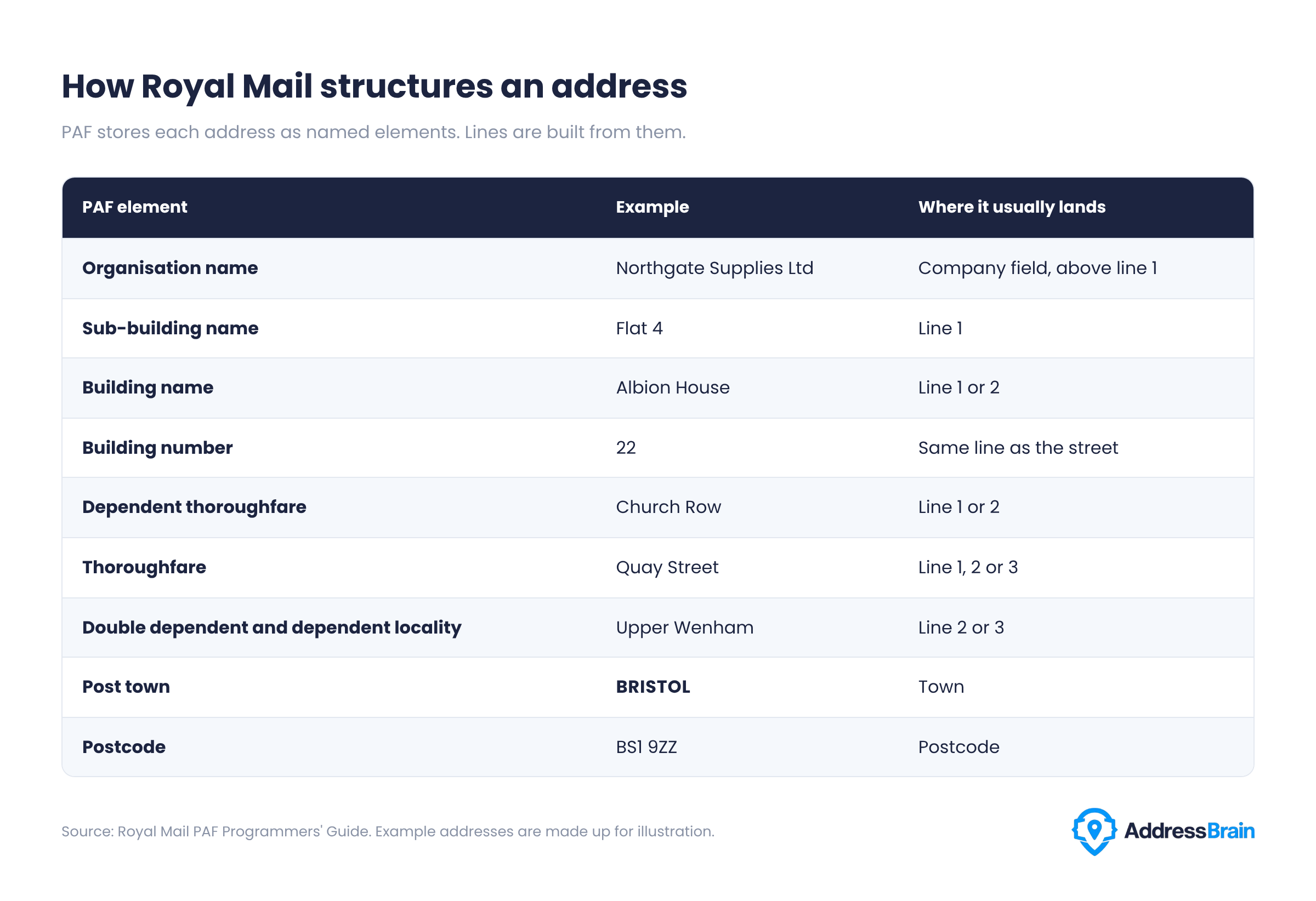
The right-hand column says "usually" for a reason. The same element lands on a different line depending on which other elements the address has, which is why a fixed rule such as "street always goes on line 2" breaks for so many addresses.
Why address forms break
Most bad address data comes from a mismatch between how people think of their address and how the form asks for it. These are the usual culprits:
- Too few lines. A flat in a named building needs more room than two lines give it, so people merge elements and the structure is lost.
- The wrong labels. The DWP's research on its find an address pattern found some people typing their whole address into the building number or name field.
- A compulsory county. People make one up or pick the wrong one, and the record no longer matches Royal Mail's data.
- Free text only. Flat 4 Albion House and 4 Albion House look like two different addresses to a database, so you end up with duplicates and failed matches.
- Global autocomplete. Tools built for every country tend to flatten UK addresses, dropping flat numbers and house names. We've covered this in detail in what Google Places autocomplete gets wrong about UK addresses.
How to design address fields that keep data clean
If you're building or reworking a checkout, sign-up or account form, these choices make the most significant difference. Most of them follow the GOV.UK Design System's address pattern, which sets the standard for forms on GOV.UK services.
- Lead with a lookup. GOV.UK recommends an address lookup for UK addresses wherever possible. The user types a postcode, picks their address from a list, and the fields fill themselves, so nobody has to decide what goes on line 2. DWP's research found that people who fill in only one search field usually choose the postcode, which is why its pattern puts the postcode first.
- Always offer manual entry. Lookups don't cover addresses outside the UK, and some properties are too new to appear yet. Give people a way to type their address on every screen, not only after a failed search.
- Use the standard fields for the manual version. GOV.UK uses Address line 1, Address line 2 (optional), Town or City, County (optional), and Postcode. Add the browser autocomplete values address-line1, address-line2, address-level2, and postal-code so that saved addresses fill in correctly.
- Be forgiving with postcodes. Accept upper or lower case, with or without the space, and tidy it up when you save it.
- Store the elements as well as the lines. When a lookup returns structured fields, keep them. Lines are for showing and printing an address; the elements are what you match, deduplicate, and validate against.
- Only make fields compulsory when you need them. Line 2 and county should always be optional.
Where AddressBrain sits
This is where the source of your address data matters. AddressBrain is a UK address lookup and validation API built on officially licensed Royal Mail PAF data. It returns each address as structured PAF fields, so you can fill line 1, line 2, town and postcode from a single postcode search and keep the underlying elements for matching.
You can see the fields in the API reference, read how address autocomplete works in a live form, or run your checkout through our five-minute address checkout audit first.
Frequently asked questions
What is address line 1?
Address line 1 is the first line of your address, also called the first line of address. It's usually your house number and street, such as 14 Mill Lane. If your home has a name but no number, the name goes here. If you live in a flat, the flat number goes here.
What is address line 2?
Address line 2 holds the next part of the address when line 1 isn't enough on its own: the street when line 1 is a house name or flat, a building name, or a village. Many addresses leave it blank.
Is address line 2 required?
No. Fill it in only if your address has a part that doesn't fit on line 1. A well-designed form marks it as optional.
What is address line 3?
Address line 3 is for addresses with one more layer, usually a village or area that sits between the street and the post town. Most addresses don't need it.
Do I need to put the county in a UK address?
No. Royal Mail stopped using postal counties for sorting in 1996, and the county isn't needed when the post town and postcode are included. You can add it if you like.
What should I put for billing address line 1 and 2?
Use the address your card or account is registered to, split across the lines in the same way as any other address: house number and street on line 1, and a flat number, building name or village on line 2 if you have one.
How do I write a UK address with a flat number?
Put the flat on line 1 and the building name or street on line 2. If the building has both a name and a street address, the street goes on line 3. Write the post town and postcode below.